
Stop Losing Hours at Month-End — Use a Smarter System
🇩🇪 Also available in German: Checkliste Monatsabschluss: Die Excel-Vorlage für Ihr Rechnungswesen
Every accountant knows the feeling. The last week of the month arrives and suddenly everything is urgent. Invoices are missing. Reconciliations are incomplete. The team is chasing information from five different departments. Deadlines are slipping and the pressure is mounting.
It does not have to be this way.
A well-structured Month-End Close Checklist Excel Template transforms your month-end close from a stressful scramble into a smooth, repeatable and fully trackable process. Whether you are a solo bookkeeper, a small accounting team or a finance department supporting a mid-sized company, the right template saves you hours, reduces errors and gives you complete visibility over every task.
In this article you will learn exactly what a month-end close checklist is, why it matters, what it should include and how an automated Excel template takes your month end closing process to the next level.
What Is a Month-End Close Checklist?
A month-end close checklist is a structured list of all accounting and finance tasks that must be completed at the end of each accounting period. It covers every area of the general ledger — from bank reconciliations and accounts payable to intercompany adjustments and financial reporting.
The checklist ensures that:
- No task is forgotten or duplicated
- Every team member knows exactly what they are responsible for
- Deadlines are tracked and overdue items are flagged immediately
- Management has real-time visibility over the close progress
- The process is consistent and repeatable every single month
Without a checklist, month-end close relies on memory, email chains and informal agreements — all of which create risk, delays and frustration.
Why Excel Is Still the Best Tool for Month-End Close Checklists
Despite the rise of cloud-based accounting software and ERP systems, Excel remains the most widely used tool for managing month-end close processes — and for good reason.
Excel is flexible. You can customize it to match your exact workflow, your team structure and your company’s specific accounting requirements. No expensive software subscription. No IT setup. No learning curve for your team.
Excel is accessible. Every accountant and bookkeeper already knows how to use it. You can share it with your team instantly, whether they are in the office or working remotely.
Excel is powerful. With the right formulas, conditional formatting and automated progress tracking, an Excel template can do everything a dedicated project management tool can do — at a fraction of the cost.
And most importantly: Excel works. Thousands of accounting teams around the world close their books every month using a well-built Excel checklist. It is proven, reliable and trusted.
What Does The Month-End Close Checklist Include?
A comprehensive month-end close checklist covers all major accounting areas. Here is what the checklist includes:
1. Bank and Cash Reconciliation
2. Accounts Receivable
3. Accounts Payable
4. Balance Sheet Reconciliations
5. Intercompany and Dividends
6. Accruals
7. Fixed Assets and Depreciation
8. Provisions
9. Payroll
10. VAT Advance Return
11. Foreign Currency Revaluation
12. Analysis
13. Period Close
14. Group Reporting
What Makes the Month-End Close Checklist Excel Template Different?
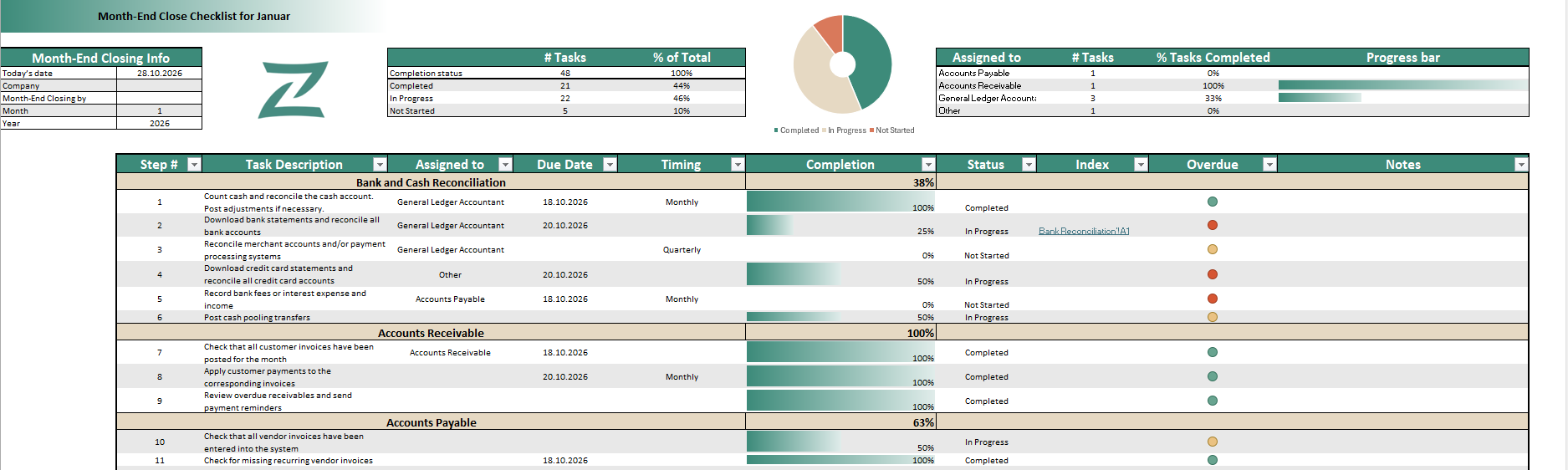
This is not a simple list of tasks in a spreadsheet. This Month-End Close Checklist Excel Template is a fully automated, dynamic tracking tool built specifically for accounting and bookkeeping teams.
Here is what makes it stand out:
Automated Progress Tracking
Every task has a completion percentage field. As your team updates their tasks, the template automatically calculates the overall close progress — by area, by team member and for the entire close. You see exactly where you stand at any moment.
Visual Dashboard
The overview tab features a clean, professional dashboard with a donut chart showing completed, in-progress and not-started tasks at a glance. Color-coded status indicators make it immediately clear what needs attention.
Overdue Flagging
Every task has a due date. The template automatically flags overdue tasks in red so nothing slips through the cracks. No more manually checking which deadlines have passed.
Assignment Tracking
Each task can be assigned to a specific team member or role — Accounts Payable, Accounts Receivable, General Ledger Accountant or any custom assignment. The dashboard shows each person’s task count and completion rate, making it easy to manage workload and accountability.
Flexible Timing Filters
Tasks can be tagged as monthly or quarterly. This means your checklist automatically shows only the tasks relevant to the current period — no confusion about which tasks apply this month.
Professional Design
Built with a clean teal-green and sand-beige color palette and the Zenside Finance branding, this template looks as professional as it performs. It is a tool you will be proud to share with your team, your manager or your clients.
Who Is This Template For?
The Month-End Close Checklist Excel Template is designed for:
- Bookkeepers managing the full close process for one or more clients
- Accounting teams in small to mid-sized companies who need a structured, trackable workflow
- Finance managers and controllers who need visibility over the close without micromanaging their team
- Interim accountants and freelancers who want to bring a professional, repeatable process to every new engagement
- CFOs and finance directors who want to reduce their close cycle time and improve reporting quality
Whether you are closing the books for a single entity or coordinating across multiple departments, this template scales with your needs.
How to Use the Month-End Close Checklist Template
Getting started takes less than ten minutes:
- Open the template in Microsoft Excel or Google Sheets
- Enter your company name, the month and year, today’s date will update automatically
- Assign each task to the relevant team member or role
- Set due dates for every task in your checklist
- Update completion percentages as your team works through the close
- Monitor the dashboard to track overall progress in real time
- Flag and follow up on any overdue or not-started items before the deadline
At the end of the month, your close is complete, documented and fully traceable — ready for audit, review or handover.
Frequently Asked Questions
Can I customize the task list? No, the Monthly Checklist by Zenside Finance is password-protected and can only be modified by employees working at Zenside Finance.
If you would like to redesign or customize the workbook to meet your company’s specific needs, please feel free to contact Zenside Finance at [email protected].
How many team members can be assigned tasks? The template supports unlimited team members. You can assign tasks to any number of individuals or roles and track each person’s progress separately on the dashboard.
Is this suitable for a multi-entity or group close? The template is designed for single-entity use.
Does the template include instructions? Yes. A dedicated “How to” tab walks you through every feature of the template step by step.
Get Your Month-End Close Checklist Excel Template Today
Stop reinventing the wheel every month. Stop relying on informal processes and email reminders. Start closing your books faster, cleaner and with complete confidence.
The Month-End Close Checklist Excel Template gives your team the structure, visibility and accountability they need to close on time — every time.
👉 Download your template today and transform your month-end close process.
Built by Zenside Finance — professional accounting tools for modern finance teams.